

ApneaLink Air Integration Guide with Sleep Medicine EHR
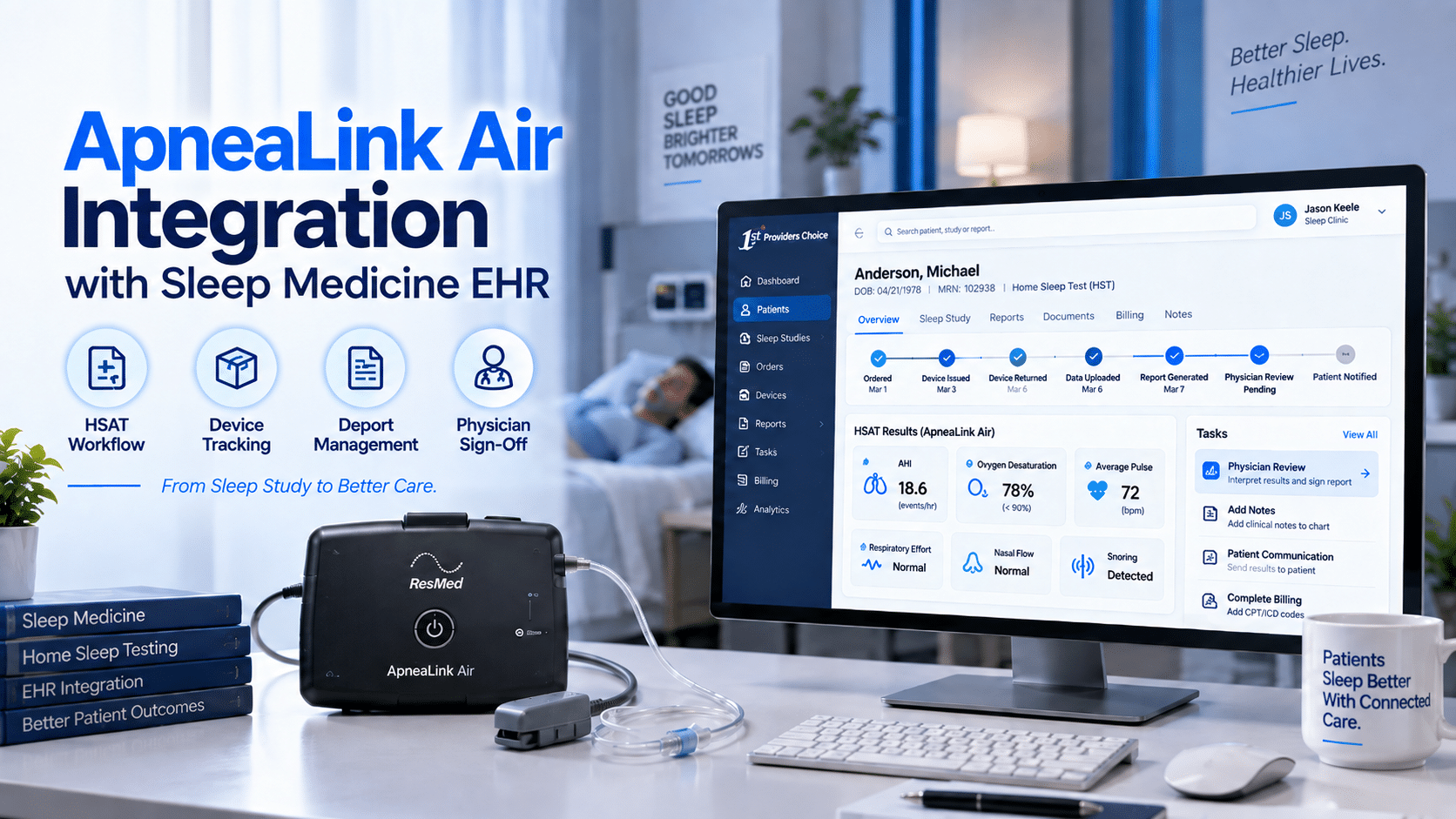
ApneaLink Air Integration with Sleep Medicine EHR
For sleep medicine practices, home sleep apnea testing is not just a diagnostic service. It is a workflow that must be ordered, scheduled, explained to the patient, tracked, returned, uploaded, scored, interpreted, signed, documented, communicated, and connected to follow-up care. That is why ApneaLink Air integration matters for sleep physicians, sleep lab managers, RPSGTs, DME/HME operators, and practice administrators.
ResMed describes ApneaLink Air as a compact home sleep testing device that can record up to five channels of information: respiratory effort, pulse, oxygen saturation, nasal flow, and snoring. ResMed also describes it as a cost-efficient Type III home sleep testing device for home sleep testing workflows.
For a Sleep Medicine EHR, the practical value is not that the EHR “diagnoses sleep apnea automatically.” It should not. The value is that the EHR helps organize the full HSAT workflow from order creation to interpreting physician signature. A strong sleep lab EHR should help staff manage the ApneaLink Air process, track device status, upload or attach the sleep study report, document AHI and oxygen desaturation findings, route interpretation tasks, communicate results to patients, and support billing documentation.
What Is ApneaLink Air?
ApneaLink Air is a ResMed home sleep testing device used in HSAT workflows. It records respiratory effort, pulse, oxygen saturation, nasal flow, and snoring during sleep. These signals support sleep study reporting and physician interpretation for suspected sleep-disordered breathing.
ApneaLink Air should be positioned as part of a diagnostic workflow, not as an automatic diagnosis engine inside the EHR. The EHR supports ordering, documentation, report management, task routing, and sign-off. The interpreting physician reviews the sleep study data and signs the diagnostic interpretation.
ApneaLink Air Integration: What It Should Mean in a Sleep Lab EHR
ApneaLink Air integration should be described carefully. Unless ResMed, the EHR vendor, and implementation documentation confirm a specific direct interface, practices should avoid claiming automatic data transfer, real-time sync, or guaranteed device-to-EHR integration.
A safer and more accurate workflow is:
- The HSAT order is created in the Sleep Medicine EHR.
- The patient receives setup instructions and device education.
- The ApneaLink Air device is used at home.
- The device is returned to the sleep lab or DME/HME workflow.
- Sleep study data is uploaded or processed through the appropriate ResMed-supported workflow.
- The sleep study report is attached, imported, referenced, or summarized in the EHR.
- A scorer, RPSGT, sleep technologist, or provider reviews the report according to practice policy.
- The interpreting physician documents and signs the result.
- The patient is contacted through the portal, phone, or follow-up appointment.
- Billing and compliance documentation is completed.
This keeps the workflow accurate, traceable, and clinically responsible.
What Is HSAT Integration?
HSAT integration means connecting the home sleep apnea test process with the EHR workflow. It includes order entry, device tracking, patient instructions, test completion, report upload or attachment, scoring workflow, physician interpretation, patient communication, and billing documentation.
HSAT integration does not mean the EHR independently diagnoses sleep apnea. It means the EHR keeps the diagnostic workflow organized so the sleep team can complete each step consistently.
The American Academy of Sleep Medicine guideline recommends that polysomnography or home sleep apnea testing with a technically adequate device be used to diagnose OSA in uncomplicated adult patients with signs and symptoms indicating increased risk of moderate to severe OSA. The same guideline recommends polysomnography rather than HSAT for patients with significant cardiorespiratory disease, possible respiratory muscle weakness, awake hypoventilation or suspected sleep-related hypoventilation, chronic opioid medication use, history of stroke, or severe insomnia.
That distinction is important for E-E-A-T. HSAT is useful, but it is not appropriate for every patient.
What Data Does ApneaLink Air Capture?
ApneaLink Air can record up to five channels:
|
Data Type |
Why It Matters in HSAT Workflow |
EHR Documentation Use |
|
Nasal flow |
Helps identify airflow changes during sleep |
Supports AHI and respiratory event review |
|
Respiratory effort |
Helps provide effort-related context |
Supports report interpretation workflow |
|
Oxygen saturation |
Shows oxygen level patterns during the test |
Supports desaturation documentation |
|
Pulse |
Adds physiologic context to the study |
Included in report review |
|
Snoring |
Supports sleep-disordered breathing review |
May be summarized in study findings |
ResMed’s patient instructions also state that ApneaLink Air records nasal respiratory airflow, snoring, blood oxygen saturation, pulse, and respiratory effort during sleep.
AHI
AHI, or apnea-hypopnea index, is one of the key sleep study values used in sleep apnea evaluation. ResMed patient education defines AHI as a measure of how many times breathing slows or stops per hour of sleep.
In the EHR, AHI should be documented as part of the physician-reviewed sleep study result, not as an automatic EHR diagnosis.
Oxygen Desaturation
Oxygen saturation and oxygen desaturation patterns help the physician understand how breathing events may affect oxygen levels during sleep. ResMed’s ApneaLink Air documentation identifies oxygen saturation as one of the device’s recorded channels.
In the EHR, oxygen desaturation findings may be documented from the final sleep study report and routed for physician interpretation.
Snoring and Flow Limitation
ResMed’s ApneaLink Air product brochure states that automatic analysis can include AHI, hypopnea index, flow limitation, snoring, and oxygen desaturation index.
These values can help structure the report review, but the EHR should not treat them as a substitute for physician interpretation.
Recommended ApneaLink Air EHR Workflow
A sleep lab EHR should support the entire HSAT workflow from order to signed report.
Step 1: Create the HSAT Order
The workflow begins with a provider order. The EHR should capture:
- Ordering provider
- Reason for study
- Patient symptoms or risk factors
- Insurance or authorization status, when applicable
- HSAT device type
- Pickup, shipment, or setup method
- Patient instruction status
- Follow-up plan
The order should be tied to the patient chart so staff can track status without searching across spreadsheets, paper notes, or disconnected systems.
Step 2: Screen for HSAT Appropriateness
HSAT is not for every patient. The EHR should help staff document whether the patient fits the practice’s HSAT criteria or whether in-lab polysomnography may be more appropriate.
The AASM guideline supports HSAT for uncomplicated adult patients at increased risk of moderate to severe OSA, but recommends in-lab polysomnography for certain higher-risk clinical situations, including significant cardiorespiratory disease, suspected hypoventilation, chronic opioid use, history of stroke, and severe insomnia.
A practical EHR checklist may include:
- Adult patient
- Suspected moderate to severe OSA
- No major exclusion criteria per practice policy
- No suspected hypoventilation concern
- No severe insomnia concern
- Provider approval documented
- In-lab PSG considered if clinically needed
Step 3: Patient Setup and Education
ApneaLink Air is designed for home sleep testing, so patient setup is critical. The EHR should document:
- Device issued or shipped
- Patient instructions provided
- Sensor setup reviewed
- Sleep diary or questionnaire provided
- Return instructions explained
- Support phone number or portal instructions provided
- Consent or acknowledgement completed, if required
Poor setup can lead to failed studies, repeat testing, delayed diagnosis, and billing issues. A clear EHR workflow helps reduce those operational gaps.
Step 4: Device Return and Data Upload
After the patient completes the home sleep apnea test, staff need to track whether the device was returned and whether the study data was usable.
The EHR should include status options such as:
- Device issued
- Device returned
- Data uploaded
- Study incomplete
- Repeat test needed
- Report generated
- Scoring pending
- Physician interpretation pending
- Patient notified
This status tracking is especially important for sleep labs handling multiple devices across multiple patients.
Step 5: Report Import, Attachment, or Summary
This is where many sleep labs lose time. If the report is generated outside the EHR, staff need a reliable way to bring the result into the patient record.
Depending on the practice’s tools and vendor capabilities, the workflow may include:
- Attaching the PDF sleep study report
- Importing structured values, if supported
- Referencing the report location
- Summarizing key values in an EHR template
- Routing the report for scoring or physician interpretation
The practice should avoid saying ApneaLink Air automatically integrates with every EHR unless that capability is verified.
Step 6: Scoring and Interpretation
ApneaLink Air reporting may include automatically derived values, but physician interpretation remains essential. ResMed ApneaLink Air materials describe automatic analysis and report generation, including AHI and related metrics.
In the EHR, the interpretation workflow should capture:
- Scoring status
- Reviewer or scorer
- Report quality or technical adequacy
- AHI
- Oxygen desaturation findings
- Snoring or flow limitation summary
- Physician interpretation
- Diagnosis statement, when appropriate
- Recommendation or next step
- Electronic signature and date
The EHR should support the physician’s documentation, not replace it.
Step 7: Physician Sign-Off
The final diagnostic result should be signed by the interpreting physician or authorized provider according to practice policy.
The EHR should support:
- Interpretation note
- Physician signature
- Date and time of sign-off
- Report attachment
- Follow-up recommendation
- Patient communication task
- Billing-ready documentation
This creates a clean record for clinical care, compliance, and revenue cycle workflows.
Step 8: Patient Communication
After interpretation, the patient needs timely communication. The method may depend on the result, practice policy, and clinical urgency.
The EHR can support:
- Patient portal result message
- Follow-up visit scheduling
- CPAP/APAP or bilevel therapy discussion
- DME referral task
- In-lab PSG recommendation
- Repeat HSAT if technically inadequate
- Education materials
The patient communication note should document who contacted the patient, when, what was discussed, and what next step was recommended.
Step 9: Billing and DME Workflow
HSAT documentation affects billing and downstream therapy workflows. If the order, report, interpretation, and patient communication are scattered, the revenue cycle team may need to chase missing information.
A better EHR workflow helps organize:
- Provider order
- Medical necessity documentation
- Authorization status, if needed
- Device issue and return status
- Sleep study report
- Interpretation note
- Physician signature
- Patient communication
- DME referral or PAP setup order
- Billing status
For sleep labs and DME/HME operators, this connection between clinical documentation and operational follow-through is essential.
Workflow Checklist for ApneaLink Air Integration
Use this checklist to evaluate whether your Sleep Medicine EHR supports the HSAT process properly.
- HSAT order created in the patient chart
- Patient eligibility or appropriateness documented
- Device issue or shipment tracked
- Patient setup instructions documented
- Device return status tracked
- Data upload status recorded
- Report attached, imported, referenced, or summarized
- AHI and oxygen desaturation findings documented from the report
- Scoring or technical review completed
- Interpreting physician sign-off captured
- Patient communication completed
- Follow-up recommendation documented
- Billing and DME documentation available
When May In-Lab PSG Still Be Needed?
In-lab polysomnography may still be needed when the patient is not an appropriate HSAT candidate, when the HSAT is technically inadequate, when results are negative or inconclusive despite ongoing clinical suspicion, or when the patient has clinical factors that require more comprehensive testing.
The AASM guideline recommends polysomnography rather than HSAT for patients with significant cardiorespiratory disease, possible respiratory muscle weakness due to neuromuscular conditions, awake hypoventilation or suspected sleep-related hypoventilation, chronic opioid medication use, history of stroke, or severe insomnia.
A Sleep Medicine EHR should make it easy to document this decision and route the patient to the right next step.
Buyer-Focused Insights for Sleep Medicine EHR Selection
When evaluating a Sleep Medicine EHR for ApneaLink Air workflows, decision-makers should ask practical questions.
Does the EHR Support HSAT Order Tracking?
The EHR should track orders from provider request to device return and final report.
Can Staff Track Device Status?
Sleep labs need visibility into devices issued, returned, pending, failed, or requiring repeat testing.
Can Reports Be Attached or Imported?
The EHR should support report attachment, import, reference, or structured summary depending on vendor capabilities.
Can Interpretation Be Routed to the Physician?
The system should route sleep study reports for interpretation and capture signature, date, and follow-up recommendations.
Does the Patient Portal Support Result Communication?
The portal should support result messaging, appointment scheduling, education, and follow-up instructions.
Does the Workflow Support Billing and DME Needs?
A strong EHR should organize order documentation, report attachment, interpretation, patient communication, and DME referral information.
How 1st Providers Choice Supports HSAT Workflows
1st Providers Choice supports specialty-specific Sleep Medicine EHR workflows for practices that manage home sleep apnea testing, sleep study documentation, patient communication, follow-up scheduling, and billing-ready records.
For ApneaLink Air workflows, the priority is to keep the diagnostic process organized. That means supporting HSAT orders, device status tracking, report management, scoring workflow, interpreting physician sign-off, patient communication, and DME or billing follow-up.
A well-designed Sleep Medicine EHR should help your team move from scattered HSAT steps to a clear process:
- Order the home sleep apnea test
- Track patient setup
- Monitor device return
- Attach or summarize the report
- Route scoring and interpretation
- Capture physician sign-off
- Communicate results
- Support billing and DME follow-through
FAQs
1. What is ApneaLink Air integration?
ApneaLink Air integration refers to the workflow that connects home sleep apnea test ordering, device tracking, data upload, report attachment or import, scoring, physician interpretation, patient communication, and EHR documentation. It should not be assumed to mean automatic direct device-to-EHR connectivity unless vendor documentation confirms it.
2. What data does ApneaLink Air capture?
ApneaLink Air can record respiratory effort, pulse, oxygen saturation, nasal flow, and snoring. Reports may include values such as AHI, flow limitation, snoring, and oxygen desaturation information, depending on the report and workflow.
3. How do ApneaLink Air reports enter the patient chart?
Reports may enter the chart by PDF attachment, document upload, report reference, manual summary, or structured import if supported by the vendor workflow. Practices should verify the exact workflow before claiming direct integration.
4. Does the EHR diagnose sleep apnea automatically?
No. The EHR should not be positioned as automatically diagnosing sleep apnea. It supports documentation, routing, and report management. The interpreting physician reviews the sleep study report and signs the final interpretation.
5. When is in-lab PSG still needed after HSAT?
In-lab PSG may be needed when HSAT is technically inadequate, results are inconclusive, clinical suspicion remains high, or the patient has conditions where PSG is recommended over HSAT, such as significant cardiorespiratory disease, suspected hypoventilation, chronic opioid use, history of stroke, or severe insomnia.
Conclusion
ApneaLink Air can support efficient home sleep apnea testing, but the real operational value comes from a clean sleep lab workflow. A practical ApneaLink Air integration strategy should help practices manage HSAT orders, patient setup, device return, report upload, scoring, physician interpretation, patient communication, and billing documentation.
The EHR should not be described as automatically diagnosing sleep apnea or as directly integrating with every device workflow unless that capability is verified. Instead, the Sleep Medicine EHR should keep the diagnostic process organized, traceable, and ready for physician sign-off.
1st Providers Choice can help sleep practices build a more organized Sleep Medicine EHR workflow for ApneaLink Air HSAT documentation, sleep study report management, physician interpretation, patient communication, and revenue-cycle support.