

ResMed AirSense 11 Integration with Sleep Medicine EHR
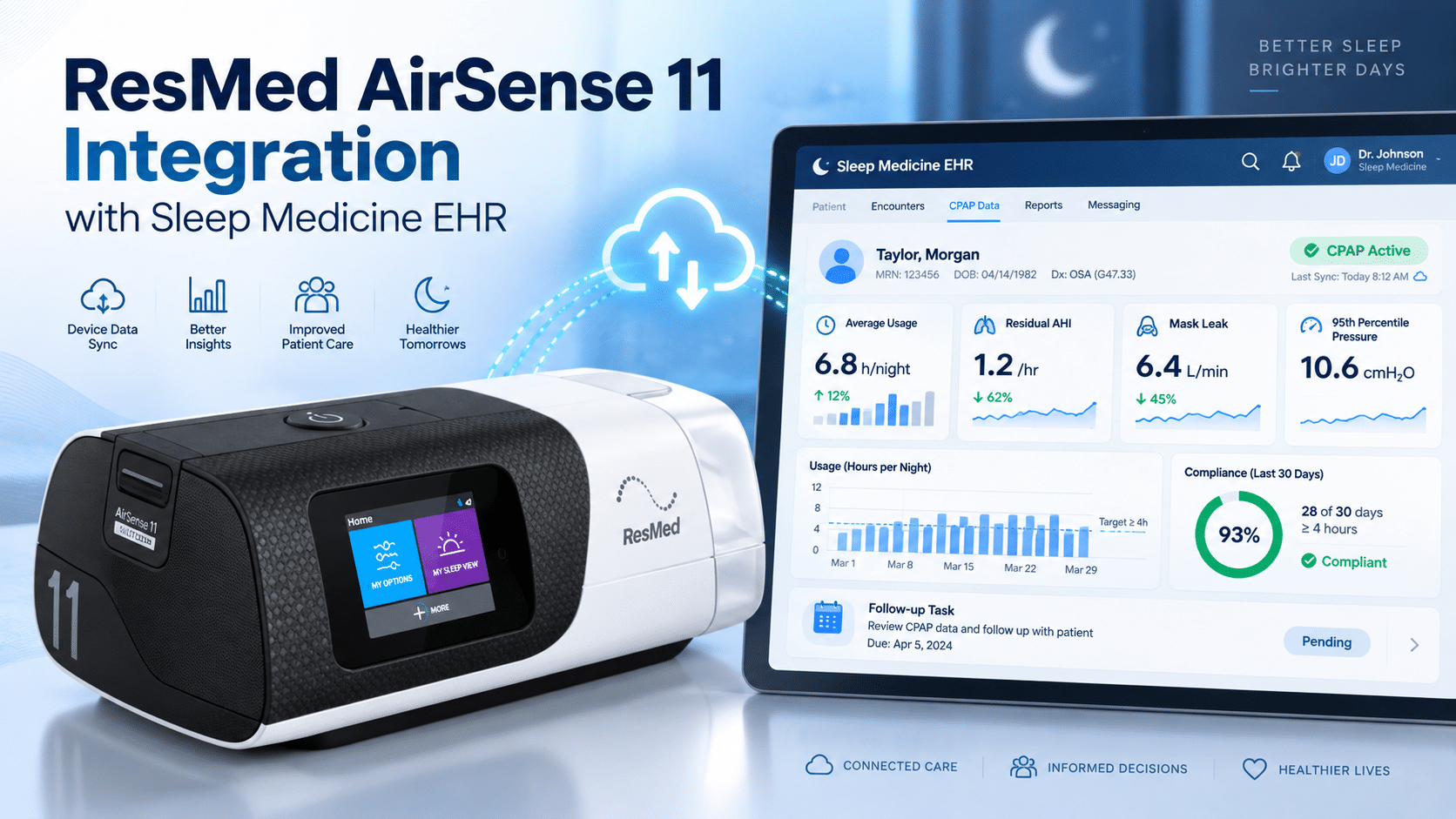
ResMed AirSense 11 Integration Guide with Sleep Medicine EHR
For sleep medicine practices, CPAP follow-up is where therapy success often becomes visible. A patient may leave the clinic with a CPAP or APAP device, but the real work begins after setup: reviewing usage hours, identifying mask leak, checking residual AHI, watching pressure trends, documenting compliance, and contacting the patient before small problems become therapy abandonment.
That is why ResMed AirSense 11 integration matters for sleep physicians, sleep lab managers, RPSGTs, DME/HME operators, and practice administrators. The goal is not simply to “connect a device.” The real goal is to build a reliable follow-up workflow inside a Sleep Medicine EHR so clinical teams can review AirSense 11 data through the ResMed ecosystem, document the findings, route tasks, support patient portal communication, and maintain cleaner compliance records.
ResMed describes AirSense 11 AutoSet as an auto-adjusting CPAP device with an integrated heated humidifier, wireless connectivity, advanced event detection, and patient support features. ResMed also describes AirView as a secure cloud-based system for managing patients with sleep-disordered breathing and respiratory insufficiency.
For practices evaluating a Sleep Medicine EHR, the practical question is this: can your EHR help your team turn AirSense 11 therapy data into documented, trackable follow-up action?
Why AirSense 11 Data Matters for OSA Follow-Up
Obstructive sleep apnea therapy does not end when the device is dispensed. Patients need ongoing support, especially during the early therapy period when mask discomfort, pressure intolerance, dry mouth, leak, anxiety, or poor education can reduce PAP adherence.
AirSense 11 supports OSA therapy by helping deliver CPAP/APAP treatment and by connecting patients and care teams to therapy information through ResMed’s data ecosystem. For patients, ResMed says the AirSense 11 includes access to myAir, an online support program and app that uses data from the machine to show how the patient slept and provide coaching tips.
For healthcare professionals, AirView supports patient management by allowing clinicians to access patient data, simplify workflows, share clinical insights, and support follow-up.
In a busy sleep practice, however, data is only useful if it becomes workflow. A Sleep Medicine EHR should help the team answer:
- Is the patient using PAP therapy enough?
- Is mask leak affecting comfort or therapy quality?
- Is residual AHI still elevated?
- Are pressure trends or settings creating problems?
- Does the patient need education, DME support, or provider review?
- Is compliance documentation complete for payer and follow-up needs?
That is the practical value of a structured ResMed AirSense 11 integration workflow.
ResMed AirSense 11 Integration: What It Should Mean in a Sleep Medicine EHR
ResMed AirSense 11 integration should be described carefully. Unless vendor documentation confirms a specific direct interface or real-time API connection, practices should avoid assuming that every EHR directly receives live AirSense 11 data.
A more accurate and practical approach is to think in terms of a data-informed workflow:
- AirSense 11 therapy data is reviewed through the ResMed ecosystem, such as AirView.
- Key findings are documented in the Sleep Medicine EHR.
- CPAP compliance reports are attached, referenced, or summarized.
- Follow-up tasks are routed to the right staff member.
- Patient portal messages or calls are triggered when outreach is needed.
- Provider interpretation is documented when clinical decisions are required.
- Billing and compliance teams can locate the documentation when needed.
This approach gives practices operational value without making unsupported claims about guaranteed direct device-to-EHR connectivity.
What AirSense 11 Data Matters Most?
A strong sleep apnea follow-up workflow should not focus on only one number. Usage hours, residual AHI, leak, pressure, symptoms, and patient communication all matter.
Usage Hours
Usage hours show whether the patient is wearing the device long enough and often enough to support therapy goals and compliance review. For CPAP compliance workflows, usage hours are usually one of the first items staff check.
ResMed’s myAir patient guidance explains that patients can see how long they used their CPAP machine the night before, whether the mask leaked, and how many apneas or hypopneas occurred.
Inside the EHR, staff should document:
- Report date range
- Average nightly usage
- Nights used
- Nights meeting compliance threshold, when applicable
- Patient-reported barriers
- Follow-up action taken
This turns raw usage data into a clear follow-up record.
Residual AHI
Residual AHI helps the provider understand whether apnea and hypopnea events are still being detected during PAP therapy. It should not replace physician interpretation, but it is an important signal for follow-up.
If residual AHI is elevated, the team should consider the broader picture: usage, leak, pressure trend, central event flags where available, symptoms, mask fit, and provider judgment. ResMed patient education notes that if a patient cannot identify what is causing a rising apnea-hypopnea index, they should talk to a doctor or equipment provider.
In the EHR, residual AHI documentation should include:
- Residual AHI from the reviewed report
- Trend compared with prior reports
- Whether leak may affect interpretation
- Symptoms such as sleepiness, snoring, awakenings, or poor sleep quality
- Provider review when clinically appropriate
Mask Leak
Mask leak is one of the most common reasons patients struggle with PAP therapy. Leak may cause discomfort, noise, dry mouth, poor sleep, or inaccurate therapy interpretation.
ResMed’s myAir scoring guidance states that mask seal affects the myAir score and that poorer mask seal can affect comfort and treatment quality.
In a Sleep Medicine EHR, mask leak should create workflow action. For example:
- Mild leak: send portal education about mask fit
- Repeated leak: assign RPSGT follow-up
- Severe leak: coordinate DME mask refit
- Leak plus poor usage: schedule earlier follow-up
- Leak plus elevated residual AHI: route for provider review
This helps the practice intervene before the patient stops therapy.
Pressure Trends
AirSense 11 AutoSet can adjust pressure based on patient needs. Pressure trends can help the provider evaluate whether pressure intolerance, inadequate pressure, or patient comfort concerns may be affecting adherence.
Pressure review should be documented carefully. Staff can record pressure settings or trend details from the report, but treatment changes should remain under appropriate provider direction and vendor-supported workflow.
The EHR should help document:
- Current pressure settings or pressure range
- Pressure trend notes from the report
- Patient comfort complaints
- Provider assessment if pressure changes may be needed
- Follow-up plan
CPAP Compliance Status
CPAP compliance is both a clinical and administrative workflow. A patient may be improving clinically, but if documentation is missing, staff may still face payer, DME, or revenue cycle delays.
A Sleep Medicine EHR should make it easy to record compliance review in a way that supports patient care and documentation needs.
Useful fields include:
- Compliance period reviewed
- Usage summary
- Compliance status
- Report attached or referenced
- Patient contacted or not contacted
- Staff member responsible
- Provider review status
- Next follow-up date
Who Should Review AirSense 11 Data?
A strong workflow defines who reviews what. Without clear roles, reports may be checked inconsistently, patients may not receive timely outreach, and providers may be pulled into tasks that staff could handle earlier.
Sleep Physician or APP
The provider should review clinically meaningful issues, such as persistent residual AHI concerns, pressure intolerance, ongoing symptoms, complex comorbidities, or cases where treatment changes may be considered.
RPSGT or Sleep Technologist
RPSGTs and sleep technologists are well positioned to support PAP adherence, mask leak troubleshooting, patient education, and escalation. They can often identify technical barriers before a scheduled provider visit.
DME/HME Operator or Coordinator
The DME/HME team may handle mask replacement, supply issues, device support, setup documentation, and compliance-related coordination. Connecting DME communication to the EHR helps prevent fragmented follow-up.
Medical Assistant or Care Coordinator
Medical assistants and care coordinators can manage portal reminders, phone outreach, appointment scheduling, missing report follow-up, and questionnaire completion.
Billing and Revenue Cycle Team
Billing teams should not interpret clinical therapy data, but they benefit from complete documentation. Clean CPAP compliance records can reduce avoidable back-and-forth when follow-up notes, reports, or payer documentation are needed.
Recommended EHR Workflow for AirSense 11 Follow-Up
A practical Sleep Medicine EHR workflow should be simple, repeatable, and role-based.
Step 1: Identify Patients Due for PAP Follow-Up
The EHR should flag patients who recently started AirSense 11 therapy or are approaching a compliance review period.
Suggested EHR task types:
- PAP setup completed
- First adherence check due
- Compliance report needed
- Low usage review
- Mask leak follow-up
- Provider review required
- DME support needed
- Follow-up appointment due
Step 2: Review AirSense 11 Data Through AirView
AirView is the logical review point in the ResMed ecosystem for clinical teams using supported ResMed workflows. ResMed describes AirView as helping care teams manage patients with sleep-disordered breathing, access patient data, simplify workflows, and support follow-up.
The EHR workflow should not claim direct live integration unless confirmed. Instead, the EHR should support structured documentation and report management after AirView review.
Step 3: Document the Key Data in the EHR
A useful AirSense 11 follow-up note may include:
- Report source reviewed
- Date range reviewed
- Usage hours
- CPAP compliance status
- Residual AHI
- Mask leak
- Pressure trend or pressure setting context
- Patient symptoms or concerns
- Staff outreach
- Provider interpretation, if needed
- Next follow-up step
This makes the follow-up record easier to understand for providers, staff, DME partners, and billing teams.
Step 4: Route Tasks Based on the Problem
A strong Sleep Medicine EHR should route issues to the correct person.
Examples:
- Low usage hours → care coordinator outreach
- Mask leak → RPSGT or DME mask support
- Elevated residual AHI → provider review
- Missing compliance report → administrative task
- Patient discomfort → portal education plus follow-up call
- Pressure intolerance → provider review or clinical escalation
This keeps the workflow organized and reduces unnecessary provider burden.
Step 5: Use the Patient Portal for Education and Follow-Up
Patient portal communication can help support adherence when messages are clear, timely, and documented.
Examples of portal messages:
- “Your PAP usage appears lower than expected. Are you having mask or comfort issues?”
- “Your report suggests possible mask leak. Please check your mask fit or contact our team.”
- “Please complete your CPAP follow-up questionnaire before your visit.”
- “Your provider reviewed your therapy report and recommends follow-up.”
The EHR should store these communications so the full adherence story is visible during the next visit.
Step 6: Close the Loop
The workflow should not end when a task is created. Staff should close the loop by documenting whether the patient was contacted, what was discussed, what action was taken, and whether provider review is still needed.
A strong closing note may look like:
“AirSense 11 therapy report reviewed through AirView workflow. Usage hours, residual AHI, mask leak, and pressure trend documented. Patient reports mask discomfort and dry mouth. RPSGT task created for mask troubleshooting. Portal education sent. Provider review requested if residual AHI remains elevated after mask issue is addressed.”
When Should Staff Contact the Patient?
Staff should contact the patient when the data or documentation suggests a risk to adherence, therapy effectiveness, or compliance review.
Common outreach triggers include:
- Low usage hours
- Declining PAP adherence
- No available report when follow-up is due
- Persistent or high mask leak
- Residual AHI trend that needs review
- Pressure intolerance symptoms
- Patient reports dry mouth, discomfort, anxiety, or mask problems
- Missed sleep apnea follow-up appointment
- Compliance window approaching
- DME supply issue or mask replacement need
The goal is not to contact every patient for every small data variation. The goal is to identify patterns that may affect adherence, patient comfort, provider decision-making, or compliance documentation.
Revenue Cycle Value of Better AirSense 11 Workflows
AirSense 11 follow-up is clinical, but it also affects operations and revenue cycle performance.
When CPAP compliance documentation is incomplete, practices may face:
- Delayed follow-up visits
- Missing report requests
- DME coordination problems
- Payer documentation gaps
- More staff back-and-forth
- Harder chart review before appointments
- Poor visibility into patient outreach
A better Sleep Medicine EHR workflow can help the practice organize:
- PAP adherence documentation
- CPAP compliance notes
- Attached or referenced reports
- Patient communication
- Provider review status
- DME coordination tasks
- Follow-up reminders
- Billing-supporting documentation
This is why ResMed AirSense 11 integration should be evaluated as a complete workflow, not only a technical connection.
Buyer-Focused Checklist for Sleep Medicine EHR Selection
When evaluating a Sleep Medicine EHR for AirSense 11 workflows, practices should ask direct questions.
Does the EHR Support PAP Adherence Documentation?
The system should make it easy to record usage hours, compliance status, residual AHI, leak, pressure trends, patient symptoms, and follow-up actions.
Can Staff Attach or Reference AirView Reports?
The EHR should allow reports to be uploaded, attached, referenced, or summarized so providers and billing teams can find documentation quickly.
Can Tasks Be Routed by Role?
Look for task routing by provider, RPSGT, medical assistant, care coordinator, billing team, or DME coordinator.
Does the Patient Portal Support CPAP Follow-Up?
The portal should help send reminders, collect patient concerns, support education, and document outreach.
Does the Vendor Explain Integration Clearly?
Avoid vague claims. A trustworthy vendor should explain what is supported directly, what requires configuration, and what depends on third-party systems or vendor documentation.
Can the Workflow Support Compliance and Revenue Cycle Needs?
The EHR should support clean follow-up documentation, compliance tracking, and easier access to reports when payer or DME documentation is needed.
How 1st Providers Choice Supports Sleep Medicine EHR Workflows
1st Providers Choice helps sleep medicine practices manage specialty-specific workflows across documentation, scheduling, patient communication, task management, and compliance follow-up.
For practices using AirSense 11 devices, the priority is to make therapy follow-up more organized. That means helping teams document AirView report review, track usage hours, monitor residual AHI and mask leak, assign follow-up tasks, support patient portal communication, and keep compliance documentation easier to find.
A well-designed Sleep Medicine EHR should help the practice move from scattered follow-up to a clear process:
- Review AirSense 11 data through the appropriate ResMed workflow
- Document the findings in the patient chart
- Route issues to the right team member
- Contact the patient when needed
- Support provider interpretation
- Maintain compliance-ready documentation
- Reduce operational friction for staff
FAQs
1. What data matters most for ResMed AirSense 11 integration?
The most important data includes usage hours, CPAP compliance status, residual AHI, mask leak, pressure trends, report date range, patient symptoms, and follow-up actions. These data points help the care team understand whether the patient is using therapy, whether issues are affecting comfort, and whether provider review is needed.
2. Does AirSense 11 integrate directly with every Sleep Medicine EHR?
No. Practices should not assume that AirSense 11 connects directly to every EHR or sends real-time data into every system. Unless vendor documentation confirms a specific interface, it is safer to describe the workflow as AirView data review plus EHR documentation, task routing, report attachment, and patient follow-up.
3. Who should review AirSense 11 compliance data?
RPSGTs, sleep technologists, care coordinators, DME/HME staff, and providers may all participate. Providers should review clinically significant concerns, such as persistent residual AHI, pressure intolerance, ongoing symptoms, or cases where treatment decisions may be needed.
4. When should staff contact a patient after reviewing AirSense 11 data?
Staff should contact the patient when usage hours are low, mask leak is persistent, residual AHI needs review, data is missing, the patient reports discomfort, or the compliance review window is approaching. Early outreach can help address barriers before the patient stops using therapy.
5. How should AirSense 11 reports be documented in the EHR?
The EHR note should include the report date range, usage hours, compliance status, residual AHI, mask leak, pressure trend, patient concerns, outreach completed, task routing, and provider interpretation when appropriate. The practice should attach, reference, or summarize the report according to its documentation policy.
Conclusion
AirSense 11 can provide valuable therapy information for sleep apnea follow-up, but the data only becomes useful when the practice has a clear workflow. A practical ResMed AirSense 11 integration strategy should help sleep teams review AirView data, document usage hours, track residual AHI and mask leak, monitor pressure concerns, route follow-up tasks, communicate through the patient portal, and maintain compliance-ready records.
For sleep medicine practices, the best EHR is not just a place to store notes. It should help the team act on CPAP compliance data, support PAP adherence, improve follow-up visibility, and reduce administrative friction.
1st Providers Choice can help sleep practices build a more organized Sleep Medicine EHR workflow for AirSense 11 follow-up, patient communication, compliance documentation, and revenue-cycle support.